
In this “VMware vCenter – Operations Manager for View – Fundamentals [v5.X]” course you will learn the main features and benefits of vCenter Operations Manager as well as how to install and configure it and how to work with the vCenter Operations Manager for View.
Bittnet carries out VMware trainings through authorized partners.
VMware vCenter – Operations Manager for View – Fundamentals [v5.X] is a course focused on the fundamentals of monitoring, analyzing, and managing VMware View environments from an operational perspective. The course introduces VMware vCenter Operations Manager for View, a solution designed specifically for VMware View virtual desktop infrastructure (VDI), with an emphasis on infrastructure visibility, performance analysis, capacity awareness, and troubleshooting. It helps participants understand how operational monitoring can move beyond simple availability checks and provide a broader picture of the health and user experience of a virtual desktop environment.
In a VDI environment, administrators have to monitor much more than individual virtual machines. A user’s experience can be affected by CPU and memory contention, storage performance, network conditions, desktop configuration, host utilization, or other components of the virtual infrastructure. As the number of virtual desktops increases, manually examining each component becomes increasingly inefficient. VMware vCenter Operations Manager for View was designed to address this complexity by collecting and analyzing operational data and presenting it through dashboards and performance indicators that help administrators identify abnormal behavior and investigate potential issues.
The course begins by establishing an understanding of VMware View and the operational challenges associated with managing a virtual desktop infrastructure. Participants explore the role of monitoring within a virtual environment and learn why traditional infrastructure monitoring approaches may not provide sufficient information for understanding the actual quality of service experienced by users. The course introduces the architecture of vCenter Operations Manager for View and explains how its components interact with the VMware View environment and the underlying virtual infrastructure.
A central concept is the collection and interpretation of performance metrics. vCenter Operations Manager for View gathers information from the monitored environment and uses analytics to help administrators understand whether observed behavior is normal or represents a potential problem. Rather than depending exclusively on fixed thresholds, the platform was designed around behavioral analysis and dynamic thresholds, allowing it to identify deviations from established patterns. This approach is particularly valuable in VDI environments, where resource consumption can vary considerably throughout the day and rigid thresholds can generate large numbers of irrelevant alerts.
The course therefore places significant emphasis on understanding the difference between raw monitoring data and actionable operational information. Participants learn how performance indicators can be interpreted in context and how different measurements can be correlated to identify potential causes of performance degradation. This helps develop a more systematic approach to troubleshooting, in which administrators investigate the relationships between virtual desktops, users, hosts, resources, and the broader VMware infrastructure rather than examining each element in isolation.
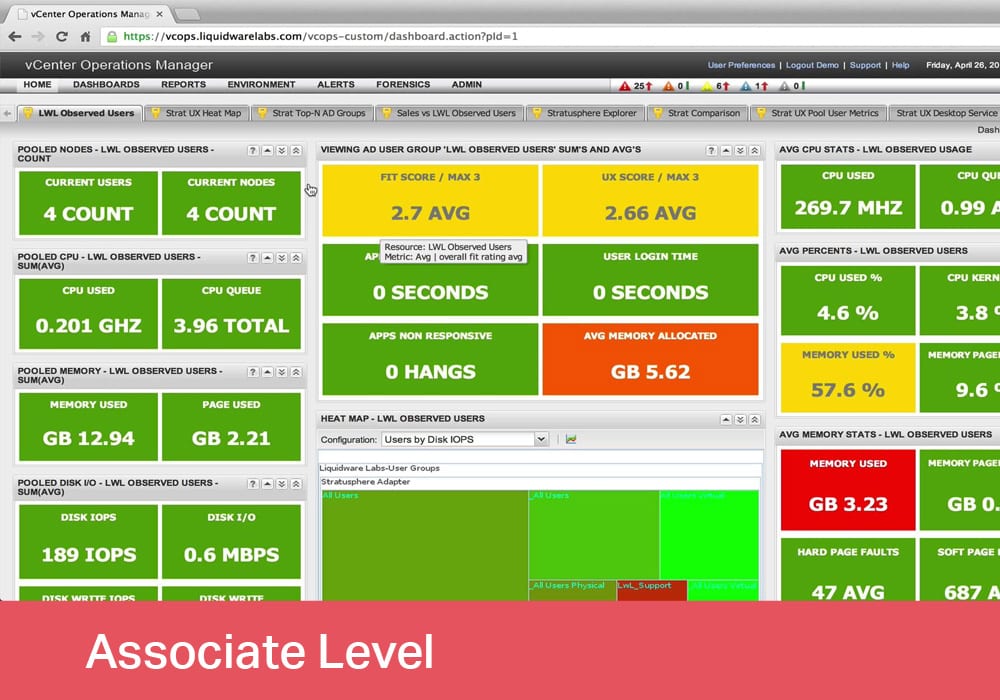
Dashboards are another important part of the course. VMware vCenter Operations Manager for View provides dashboards that allow administrators to obtain a consolidated view of the environment and quickly identify areas requiring attention. Participants learn how to navigate these dashboards, interpret the information displayed, and use the available views as a starting point for further investigation. The objective is not simply to observe whether a system is operating normally, but to understand what the available information says about the current condition of the environment.
The user-experience perspective is particularly important in this context. A VDI platform can appear healthy from a basic infrastructure perspective while individual users may still experience slow logons, poor application responsiveness, or other performance problems. vCenter Operations Manager for View was developed to provide visibility into the relationship between infrastructure performance and the experience of VMware View users. This allows administrators to approach troubleshooting from both the infrastructure and end-user perspectives.
Installation and initial configuration are also addressed. Participants become familiar with the considerations involved in deploying vCenter Operations Manager for View and connecting it to the VMware View environment. The course introduces the principal configuration activities required to establish monitoring and explains how the platform obtains information from the infrastructure. Understanding these steps is important because effective monitoring depends on correct integration with the systems and resources being observed.
The course also develops an understanding of the operational workflow associated with monitoring. Once information is collected, administrators need to determine which conditions require attention, identify the affected components, investigate the available metrics, and determine an appropriate corrective action. vCenter Operations Manager for View provides a framework for this process by bringing together information that would otherwise need to be examined through multiple management interfaces.
Troubleshooting is therefore one of the practical benefits of the technology. When a performance problem occurs, administrators can use the available dashboards and metrics to determine where the abnormal behavior is located and which resources may be contributing to it. The platform’s analytical capabilities can help distinguish between normal variations and significant deviations, allowing troubleshooting activities to be focused on the areas most likely to require intervention.
Capacity and resource management are also important considerations. VDI environments can generate highly variable workloads, and administrators need to understand how resource utilization changes over time. Historical performance information can provide useful context when evaluating infrastructure requirements, planning additional capacity, or investigating recurring performance problems. By examining trends rather than isolated measurements, administrators can make better-informed decisions about the resources required to support a growing virtual desktop environment.
The course also introduces the scalability considerations associated with monitoring VMware View environments. As VDI deployments expand, the amount of operational information increases substantially. A centralized monitoring platform can help administrators maintain visibility across large numbers of virtual desktops and users without requiring individual examination of every component. VMware subsequently expanded the capabilities of the product through later releases, increasing the scale of environments that could be monitored and adding functionality for broader Horizon View operations.
It is important to place the [v5.X] version of this course in its historical technology context. VMware vCenter Operations Manager for View belongs to an earlier generation of VMware’s end-user computing and operations-management portfolio. The product was introduced for VMware View environments and subsequently evolved into VMware vRealize Operations for Horizon as the VMware product portfolio developed. VMware View itself later became part of the VMware Horizon product family. Consequently, this course should be understood primarily as a foundation for the technologies and operational concepts of that generation rather than as training for the current VMware/Broadcom product portfolio.
Nevertheless, the underlying concepts remain highly relevant for understanding VDI operations. Monitoring virtual desktop environments requires visibility across multiple layers, including the desktop, hypervisor, storage, networking, resource utilization, and user experience. The principles of behavioral analysis, centralized dashboards, capacity planning, performance correlation, and proactive troubleshooting introduced by this course remain important concepts in modern infrastructure operations, even though the specific products and interfaces have evolved.
The course is structured as a five-day program and is classified at an Associate level. It is intended for professionals interested in VMware View and virtualized desktop infrastructure, including roles such as Cloud Engineer and Cloud Manager. No mandatory prerequisites are specified, making the course suitable as an introduction to the operational monitoring concepts associated with VMware View. Training materials are provided in English, while delivery can be conducted in Romanian depending on the training format.
For participants working with legacy VMware View environments, the course can provide useful practical knowledge for understanding existing monitoring architectures and troubleshooting methodologies. For professionals studying the evolution of VMware technologies, it also provides valuable historical context for the transition from VMware View and vCenter Operations Manager for View toward VMware Horizon and the later vRealize Operations-based management solutions.
This course is aimed at anyone interested in learning the fundamentals vCenter Operation Manager.
Upon completion you will know how to:
Diagram the vCenter Operations Manager for View architecture.
List the business challenges for an operations management environment.
List some of the problems that vCenter Operations Manager for View solves.
Describe the typical users of vCenter Operations Manager.
Explain the key features of vCenter Operations Manager for View.
Recognize the main function of each of the vCenter Operations Manager for View dashboards.
Describe some of the design considerations you need to determine before you install vCenter Operations Manager for View.
Discuss the tasks you need to complete to install and configure vCenter Operations Manager for View.
Describe the main function of the View dashboards.
Demonstrate how to navigate the View dashboards to investigate system issues.
There are no prerequisites for this course.
Module 1: Introduction
This module discusses the vCenter Operations Manager for View architecture, business challenges, problems vCenter Operations Manager for View solves, and key features of vCenter Operations Manager for View. In addition, you will learn about the vCenter Operations Manager for View user interface and dashboards, how vCenter Operations Manager for View is packaged and licensed, and about how vCenter Operations Manager for View collects data and metrics.
Module 2: Installing and Configuring vCenter Operations Manager for View
This module covers the vCenter Operations Manager for View design considerations, installation process, and configuration tasks.
Module 3: Working with the vCenter Operations Manager for View Dashboards
This module describes the function of each of the dashboards and how to use the dashboards to troubleshoot system issues.
Nu există cursuri recomandate după finalizarea acestui curs.
Nu sunt programe de ceritifcare pentru acest curs.
VMware vCenter – Operations Manager for View – Fundamentals [v5.X]
Detalii curs
FAQ training VMware vCenter - Operations Manager for View - Fundamentals `{`v5.X`}`
What is VMware vCenter Operations Manager for View and why is it important for virtual desktop environments?
VMware vCenter Operations Manager for View is a solution designed to provide visibility and operational insight into VMware View virtual desktop environments. It helps IT teams understand infrastructure performance, monitor resources and identify potential issues that can affect the availability and user experience of virtual desktop services.
Why are VMware vCenter Operations Manager for View skills important for IT professionals?
Knowledge of vCenter Operations Manager for View is valuable for professionals responsible for monitoring, managing and optimizing virtual desktop infrastructures. Understanding performance data, resource utilization and operational indicators can help IT specialists make informed decisions and maintain more reliable VMware-based environments.
In which environments can VMware vCenter Operations Manager for View be used?
VMware vCenter Operations Manager for View can be relevant in enterprise virtual desktop infrastructure, corporate desktop environments, data centers and organizations using VMware View for centralized desktop delivery. It is particularly useful where IT teams need greater visibility into virtual desktop performance, capacity and infrastructure health.
How can knowledge of VMware vCenter Operations Manager for View support my professional development?
Knowledge of VMware vCenter Operations Manager for View can strengthen your understanding of VMware virtualization, virtual desktop infrastructure and performance management. These skills can complement broader competencies in systems administration, infrastructure monitoring, capacity planning and enterprise virtualization.
What career opportunities are available for professionals with VMware VDI and monitoring skills?
Professionals with VMware VDI and infrastructure monitoring knowledge can pursue roles such as VMware Administrator, Virtualization Engineer, VDI Administrator, Infrastructure Engineer, Systems Administrator, Desktop Virtualization Specialist, Data Center Engineer or Cloud Infrastructure Engineer. These skills can also be useful for professionals involved in enterprise virtualization and infrastructure optimization projects.
How valuable are VMware virtualization and VDI management skills on the IT job market?
Virtualization and virtual desktop infrastructure remain important areas of enterprise IT because organizations need efficient ways to manage desktops, applications and infrastructure resources. VMware-related knowledge, combined with skills in monitoring, troubleshooting, performance analysis and infrastructure management, can strengthen an IT professional’s technical profile.
What are the benefits of using VMware vCenter Operations Manager for View?
Using VMware vCenter Operations Manager for View can provide greater visibility into the health and performance of virtual desktop environments. Monitoring resource utilization and performance trends can support proactive troubleshooting, capacity planning and infrastructure optimization, helping IT teams identify potential problems before they significantly affect users.
Why are performance monitoring and capacity management important in VDI environments?
Virtual desktop infrastructures depend on shared computing, storage and networking resources, so performance issues can affect many users simultaneously. Effective monitoring and capacity management help organizations understand resource consumption, identify bottlenecks, plan infrastructure requirements and maintain a consistent virtual desktop experience.
What is the relationship between VMware vCenter Operations Manager for View, VMware View and virtualization?
VMware vCenter Operations Manager for View is closely associated with the management and monitoring of VMware View environments, providing operational visibility into virtual desktop infrastructure. Understanding the relationship between VMware View, VMware vSphere, virtual machines, resource utilization and performance monitoring helps IT professionals build a more complete understanding of enterprise VDI environments.
Why is this course recommended to me?

Acest site utilizează cookie-uri
Necesare
Always active
Cookie-urile necesare ajută la a face un site utilizabil prin activarea funcţiilor de bază, precum navigarea în pagină şi accesul la zonele securizate de pe site. Site-ul nu poate funcţiona corespunzător fără aceste cookie-uri.
Preferences
The technical storage or access is necessary for the legitimate purpose of storing preferences that are not requested by the subscriber or user.
Statistici
Cookie-urile de statistică îi ajută pe proprietarii unui site să înţeleagă modul în care vizitatorii interacţionează cu site-urile prin colectarea şi raportarea informaţiilor în mod anonim.
The technical storage or access that is used exclusively for anonymous statistical purposes. Without a subpoena, voluntary compliance on the part of your Internet Service Provider, or additional records from a third party, information stored or retrieved for this purpose alone cannot usually be used to identify you.
Marketing
Cookie-urile de marketing sunt utilizate pentru a-i urmări pe utilizatori de la un site la altul. Intenţia este de a afişa anunţuri relevante şi antrenante pentru utilizatorii individuali, aşadar ele sunt mai valoroase pentru agenţiile de puiblicitate şi părţile terţe care se ocupă de publicitate.